This Template at a Glance
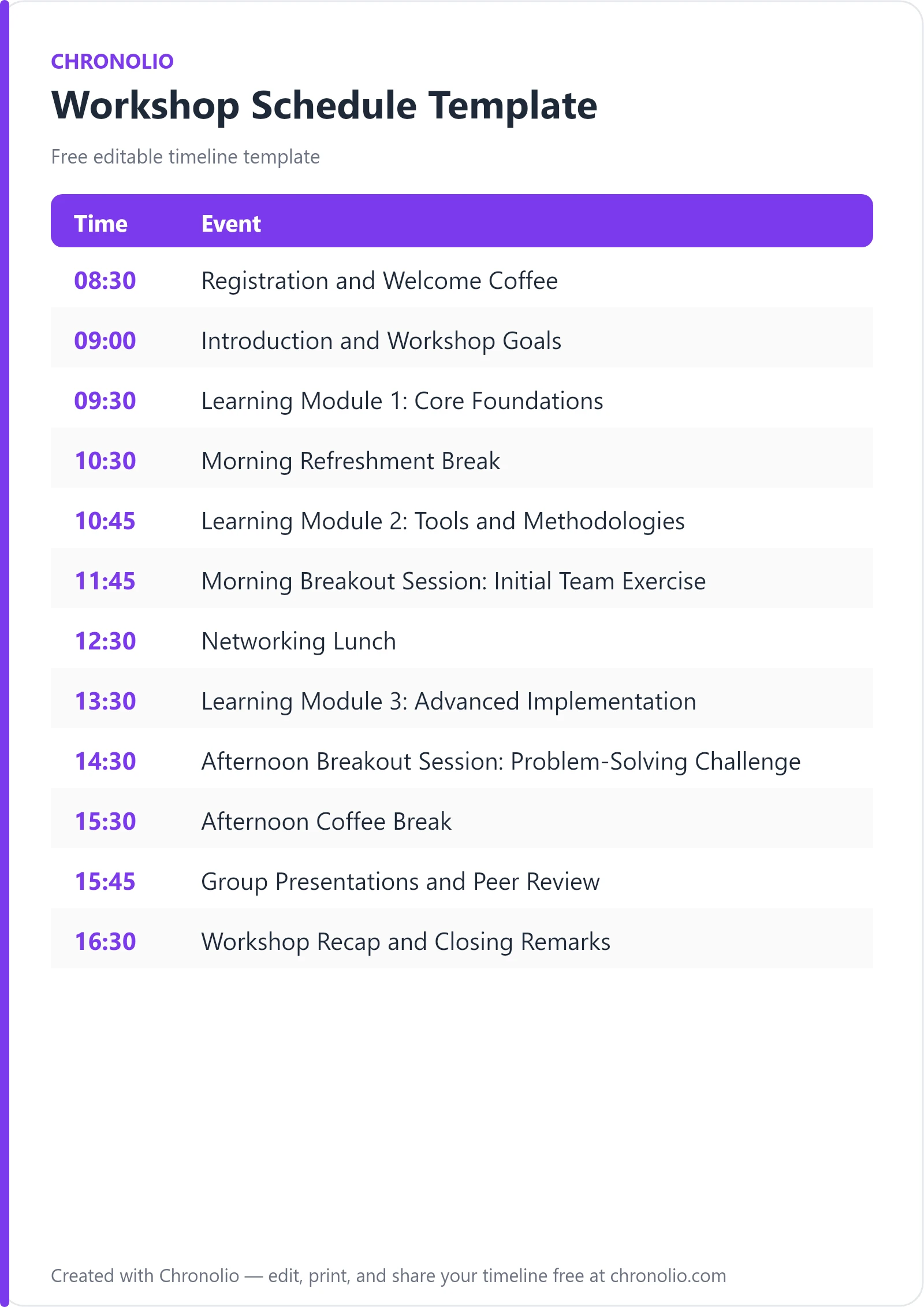
Here is the complete schedule this free template gives you — every time block, ready to edit, download, and share:
| Time | Event |
|---|---|
| 08:30 | Registration and Welcome Coffee |
| 09:00 | Introduction and Workshop Goals |
| 09:30 | Learning Module 1: Core Foundations |
| 10:30 | Morning Refreshment Break |
| 10:45 | Learning Module 2: Tools and Methodologies |
| 11:45 | Morning Breakout Session: Initial Team Exercise |
| 12:30 | Networking Lunch |
| 13:30 | Learning Module 3: Advanced Implementation |
| 14:30 | Afternoon Breakout Session: Problem-Solving Challenge |
| 15:30 | Afternoon Coffee Break |
| 15:45 | Group Presentations and Peer Review |
| 16:30 | Workshop Recap and Closing Remarks |
What Is a Workshop Schedule?
A workshop schedule is an operational master plan that structures the flow, timing, and activities of an interactive training session or corporate workshop. Unlike a basic meeting agenda that simply lists discussion topics, a comprehensive training schedule details the precise breakdown between passive learning, hands-on breakout sessions, collaborative exercises, and critical energy-restoring breaks.
Whether you are hosting a team upskilling session or leading an executive development day, this framework reflects real-world workshop structures honed across hundreds of corporate training events. It ensures that facilitators maintain control over the clock while providing attendees with enough space to absorb complex concepts, test new tools, and network with peers. By standardizing your run of show, you create a predictable rhythm that eliminates administrative confusion and maximizes educational impact.
Customize Your Free Workshop Schedule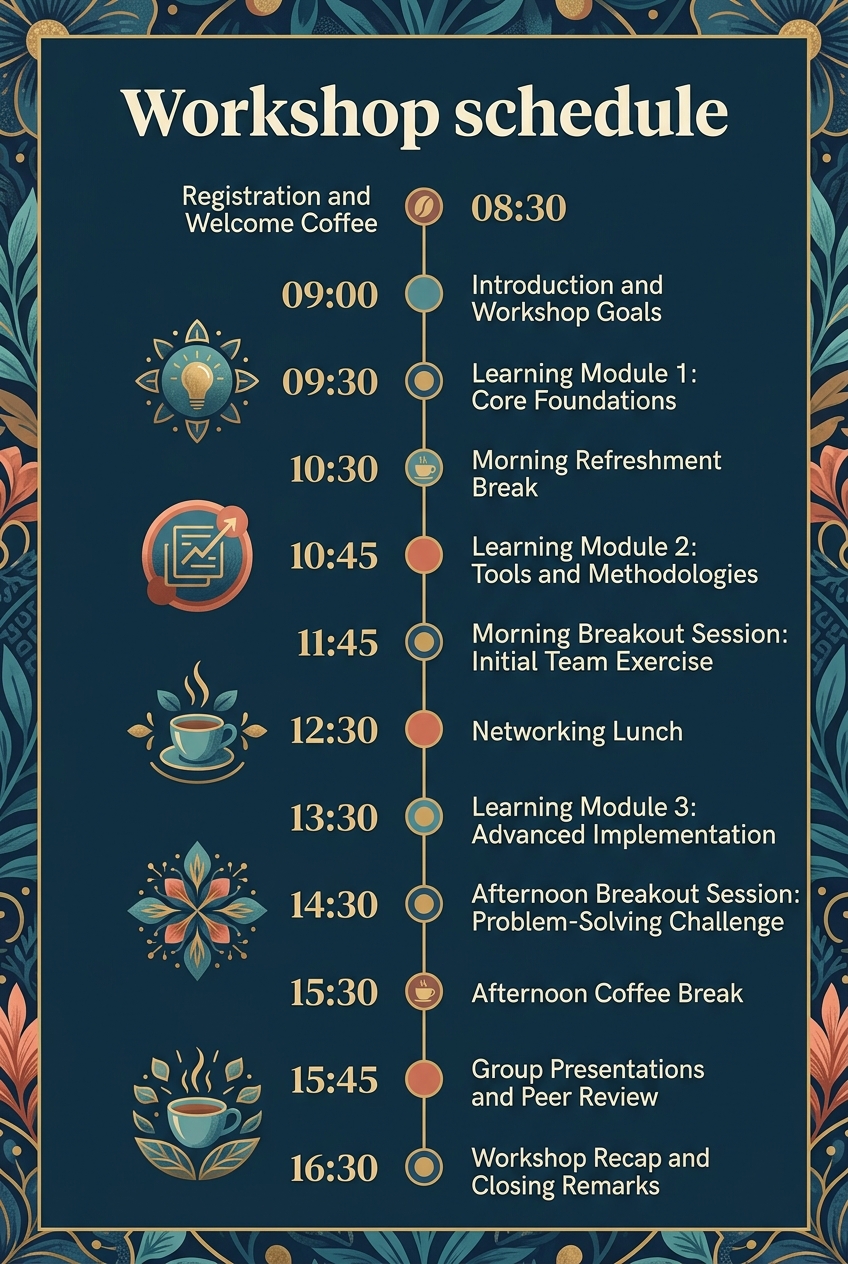
Why Workshops Need a Timeline
Running an effective educational event requires balancing complex instructional content with human attention spans. Without a structured workshop running order, even experienced facilitators risk spending too much time on morning introductions, leaving afternoon breakout groups rushed or curtailed. A deliberate timeline sets expectations early, keeping both presenters and participants aligned throughout the day.
From a venue and logistical perspective, strict time management ensures smooth coordination with catering teams and breakout room availability. Hot beverages and lunch service must align perfectly with your session breaks; otherwise, food goes cold and staff schedules are disrupted. Establishing tight time blocks allows event staff to reset rooms, check AV equipment, and prepare exercise materials without distracting attendees.
Finally, an intentional time structure prevents cognitive overload. Studies in adult learning show that retention drops significantly after 45 to 60 minutes of uninterrupted lecturing. Pacing your day with timed transitions between theory, practical exercise, and social interaction keeps participant engagement consistently high from registration to final closing remarks.
What to Include in a Workshop Schedule
To deliver a polished and valuable learning experience, your workshop schedule should incorporate several core building blocks:
- Welcome and Onboarding: Morning registration, coffee service, name badge pickup, and casual networking.
- Context Setting: Facilitator introductions, housekeeping items, safety briefing, and clear alignment on learning objectives.
- Instructional Modules: Chunked theoretical teaching sessions delivered via presentation, live software demos, or panel discussions.
- Collaborative Breakouts: Small group exercises where participants apply new frameworks to sample problems or real-world case studies.
- Strategic Breaks: Dedicated morning, lunch, and afternoon rest periods designed to combat mental fatigue and encourage informal networking.
- Peer Review & Showcases: Group presentation blocks that allow teams to share solutions, receive constructive feedback, and benchmark their work.
- Closing Synthesis: Summary of key takeaways, Q&A session, feedback survey distribution, and resource sharing.
Phase 1: Morning Onboarding & Foundations
| Time | Event |
|---|---|
| 08:30 | Registration and Welcome Coffee |
| 09:00 | Introduction and Workshop Goals |
| 09:30 | Learning Module 1: Core Foundations |
The success of any immersive seminar depends on starting with clear momentum and frictionless logistics. Allocating a full thirty minutes for morning registration and welcome coffee in the main foyer gives attendees a necessary buffer for traffic delays, badging, and grabbing morning refreshments. This casual period allows participants to settle into the venue space and begin making peer connections before formal instruction starts.
At 09:00, transition everyone into the main auditorium for the formal kickoff. Setting aside 30 minutes for introductions allows the lead facilitator to establish housekeeping rules, introduce floor captains, and align participant expectations with your overarching goals. Immediately following orientation, jump into your first instructional session while participant focus is at its absolute peak. Learning Module 1 introduces fundamental concepts, underlying theoretical models, and core industry definitions. Keeping this first module strictly conceptual provides the necessary context for every practical exercise that follows later in the day.
Phase 2: Technical Deep-Dive & Initial Application
| Time | Event |
|---|---|
| 10:30 | Morning Refreshment Break |
| 10:45 | Learning Module 2: Tools and Methodologies |
| 11:45 | Morning Breakout Session: Initial Team Exercise |
After an hour of intense theoretical instruction, a quick 15-minute refreshment break in the dining hall is vital to clear mental fatigue and allow quick bio breaks. Returning promptly at 10:45, Learning Module 2 transitions from theory to practical methodologies, demonstrating modern workflows, software toolsets, and step-by-step techniques through live demonstrations.
Once attendees have seen these tools in action, immediately put their knowledge to the test. Moving participants into breakout rooms for an initial team exercise shifts the room dynamic from passive listening to active problem-solving. In small teams of 4 to 6 people, participants analyze a standardized scenario using the exact frameworks presented in Modules 1 and 2. Just as maintaining structured timing is critical when running a high-stakes corporate event like a board meeting timeline, keeping your morning breakout strictly capped at 45 minutes forces teams to focus on core concepts rather than getting bogged down in minor details. Facilitators should circulate among rooms to answer questions and keep discussions moving forward.
Phase 3: Afternoon Mastery & Collaborative Challenge
| Time | Event |
|---|---|
| 12:30 | Networking Lunch |
| 13:30 | Learning Module 3: Advanced Implementation |
| 14:30 | Afternoon Breakout Session: Problem-Solving Challenge |
A full 60-minute catered lunch in the dining hall provides a crucial mental reset midway through the day. Beyond nutrition, the networking lunch acts as a collaborative catalyst, enabling attendees to discuss morning learnings, compare industry experiences, and build valuable professional relationships in an unscripted, relaxed environment.
At 13:30, reconvene the room for the day’s final teaching block: Learning Module 3. This session tackles complex edge cases, scaling strategies, and real-world troubleshooting techniques. With baseline concepts already mastered, participants are equipped to handle advanced case studies. Following this module, launch into the afternoon breakout challenge—the capstone exercise of the day. Working in dedicated breakout rooms, groups tackle an end-to-end design or business challenge. They must apply every model learned throughout the day to draft a comprehensive solution and prepare a 3-minute deck for room-wide presentation.
Phase 4: Synthesis, Peer Review & Closing
| Time | Event |
|---|---|
| 15:30 | Afternoon Coffee Break |
| 15:45 | Group Presentations and Peer Review |
| 16:30 | Workshop Recap and Closing Remarks |
A brief afternoon coffee break at 15:30 gives team presenters a few final minutes to polish their slide decks while refuelled with tea and baked goods in the main foyer. Managing attendee energy across a full day requires precise pacing—a principle that applies whether you are orchestrating a multi-speaker professional seminar or coordinating personal celebrations like an anniversary party schedule or a birthday party timeline.
At 15:45, move all groups back to the main auditorium for presentations and peer review. Having selected teams present their solutions to the broader audience encourages friendly competition and exposes attendees to alternative problem-solving approaches. Instructors provide real-time feedback, highlighting standout strategies and key takeaways. Finally, spend the last 30 minutes summarizing core insights, answering remaining questions, and distributing resource packs and follow-up surveys. Wrapping up precisely on time demonstrates professionalism and respects your attendees' evening commitments.
Workshop Schedule vs Workshop Agenda
While people often use the terms interchangeably, a workshop schedule and a workshop agenda serve two distinct management functions during event planning:
| Feature | Workshop Schedule | Workshop Agenda |
|---|---|---|
| Primary Focus | Precise timing, venue logistics, and exercise execution | High-level topic outline and learning objectives |
| Target Audience | Facilitators, room leads, venue staff, and attendees | Attendees, sponsors, and prospective sign-ups |
| Level of Detail | Exact start/end times, room locations, and break times | List of presentation themes and speaker names |
| Operational Use | Used on event day to run the order of events | Distributed in marketing materials prior to event |
A workshop agenda outlines what topics will be covered and why they matter to prospective registrants. Conversely, the workshop schedule dictates how the day will physically unfold hour by hour. It specifies exact start times, venue locations (e.g., Main Auditorium vs. Breakout Rooms A–D), and activity structures needed to keep the entire event operating on schedule.
Who Should Use This Template?
This versatile schedule template is engineered for anyone responsible for designing and executing interactive educational events. Chronolio provides tailored tools for various event management roles involved in corporate learning. Specific user groups include:
- Corporate Trainers & HR Managers: Professional development leads organizing internal upskilling workshops, manager bootcamps, or company-wide compliance training.
- External Consultants & Keynote Facilitators: Subject matter experts hired to deliver specialized, high-ticket client strategy sessions or design sprints.
- Agile Coaches & Scrum Masters: Teams running multi-department planning sessions, hackathons, or intensive product alignment workshops.
- Educational Institutions & Lecturers: Professors, university department heads, and vocational instructors structuring day-long academic symposia or lab intensives.
- Conference Organizers: Event managers hosting pre-conference masterclasses or specialized track workshops alongside larger convention schedules.
How to Use This Template
- Download or Duplicate the Template: Access our digital editor above or download offline files via our printable Word document template or PDF schedule template.
- Establish Your Core Time Window: Adjust the overall start and end times to match your venue access constraints and travel requirements for participants.
- Tailor Module Titles: Replace placeholder module titles with your specific topic names, tools, and learning objectives.
- Assign Venues and Facilitators: Mark specific room numbers, breakout spaces, and lead instructor names for every schedule block.
- Distribute to Key Stakeholders: Share the finalized run sheet with catering staff, AV technicians, room captains, and attendees at least 48 hours before the event.
Tips for a Successful Workshop
- Enforce Strict Breakout Timers: Display a large visual countdown clock in every breakout space. According to guidelines from the Association for Talent Development, clear time constraints foster faster group consensus and focus during practical exercises.
- Brief Room Facilitators Early: Hold a 15-minute briefing with your breakout captains before registration opens so everyone understands the prompt, time limits, and expected deliverables.
- Keep Slides Brief During Afternoon Modules: Combat post-lunch drowsiness by relying less on passive slide presentations and incorporating interactive polling, live whiteboarding, or group Q&A during Module 3.
- Buffer Your Catering Transitions: Always add 5 to 10 minutes of buffer time before lunch and final wrap-up to account for slow moving lines or extended Q&A discussions.
- Provide Printed Desk Reference Cards: Place one-page printed schedules and exercise instructions on every group table so attendees do not need to check their phones for daily timing.
- Gather Real-Time Feedback: Reserve 5 minutes before the final recap to have attendees fill out a digital evaluation survey while they are still seated in the main room.
Common Mistakes to Avoid
- Overloading the Teaching Modules: Packed slides and rushed lectures leave zero room for questions. Limit instructional slides to core concepts so participants can absorb and process the material.
- Shortchanging Break Durations: Cutting coffee or lunch breaks to squeeze in extra content leads to mental exhaustion and disengagement. Respect rest periods as crucial learning recovery time.
- Vague Breakout Prompts: Sending groups into breakout rooms without explicit written instructions, role assignments, or target outputs wastes valuable exercise time on clarification.
- Ignoring AV and Room Prep: Failing to test microphones, projectors, and breakout room flipcharts before 08:30 registration causes embarrassing delays and sets an unprofessional tone.
- Failing to Assign a Dedicated Timekeeper: Expecting the lead instructor to teach while tracking the clock almost guarantees schedule slip. Appoint a secondary staff member to give 5-minute warnings.
- Skipping the Final Synthesis: Running out of time at the end of the day often leads facilitators to skip the wrap-up. Without a recap, attendees lose out on synthesizing how all three modules tie together.
In Summary
- Proven Learning Structure: Features a balanced, 8.5-hour day that alternates instructional theory with immediate practical exercise.
- High-Engagement Pacing: Combines three core learning modules, two collaborative breakout sessions, and a group presentation showcase.
- Designed for Fatigue Management: Incorporates 30-minute morning onboarding, two 15-minute coffee breaks, and a 60-minute networking lunch.
- Highly Adaptable: Works seamlessly for corporate retreats, technical bootcamps, client workshops, and academic seminars.
- Multi-Role Approved: Perfect for enterprise facilitators, HR leaders, independent consultants, and event coordinators.
- Logistically Sound: Aligns educational content blocks directly with venue catering and room transition requirements.
Mastering the rhythm of your next educational event is simple when built upon a proven structural foundation. Whether you are guiding senior executives through strategic planning or upskilling junior teams on new software tools, this standardized framework ensures your event runs smoothly, professionally, and on time. Customize your operational schedule using our interactive tool today, or export print-ready versions for your facilitation team.
Customize Your Free Workshop Schedule