This Template at a Glance
Here is the complete schedule this free template gives you — every time block, ready to edit, download, and share:
| Time | Event |
|---|---|
| 08:30 | Arrival and Check-In |
| 09:00 | Login Assistance and System Setup |
| 09:45 | Platform Overview Keynote |
| 10:15 | Morning Coffee Break |
| 10:30 | Core Functionality Tutorial |
| 11:45 | Live Usage Workshop |
| 12:45 | Catered Lunch |
| 13:45 | Advanced Modules Tutorial |
| 14:45 | Afternoon Refreshments |
| 15:00 | Practical Testing and Skills Assessment |
| 16:00 | Open Q&A and Feedback |
| 16:30 | Certificate Awarding and Closing |
What Is a Software Training Day Timeline?
A software training day timeline is a synchronized, step-by-step master schedule that aligns lead facilitators, technical support specialists, venue operators, and corporate learners throughout an intensive technology workshop. Running an enterprise platform rollout requires far more than just walking through slide decks; it demands dedicated environment setup time, structured interactive tutorials, real-world sandbox testing, and dedicated technical troubleshooting.
Having run dozens of enterprise digital transformations and platform onboarding sessions, I can tell you that technical workshops fail when timing is treated as an afterthought. This software training day schedule reflects proven instructional design practices that balance complex technical retention with cognitive recovery breaks. It accommodates real-world friction—like forgotten password resets, single sign-on (SSO) glitches, and firewall configuration—so your main instructional modules remain completely on track.
Customize Your Software Training Day Timeline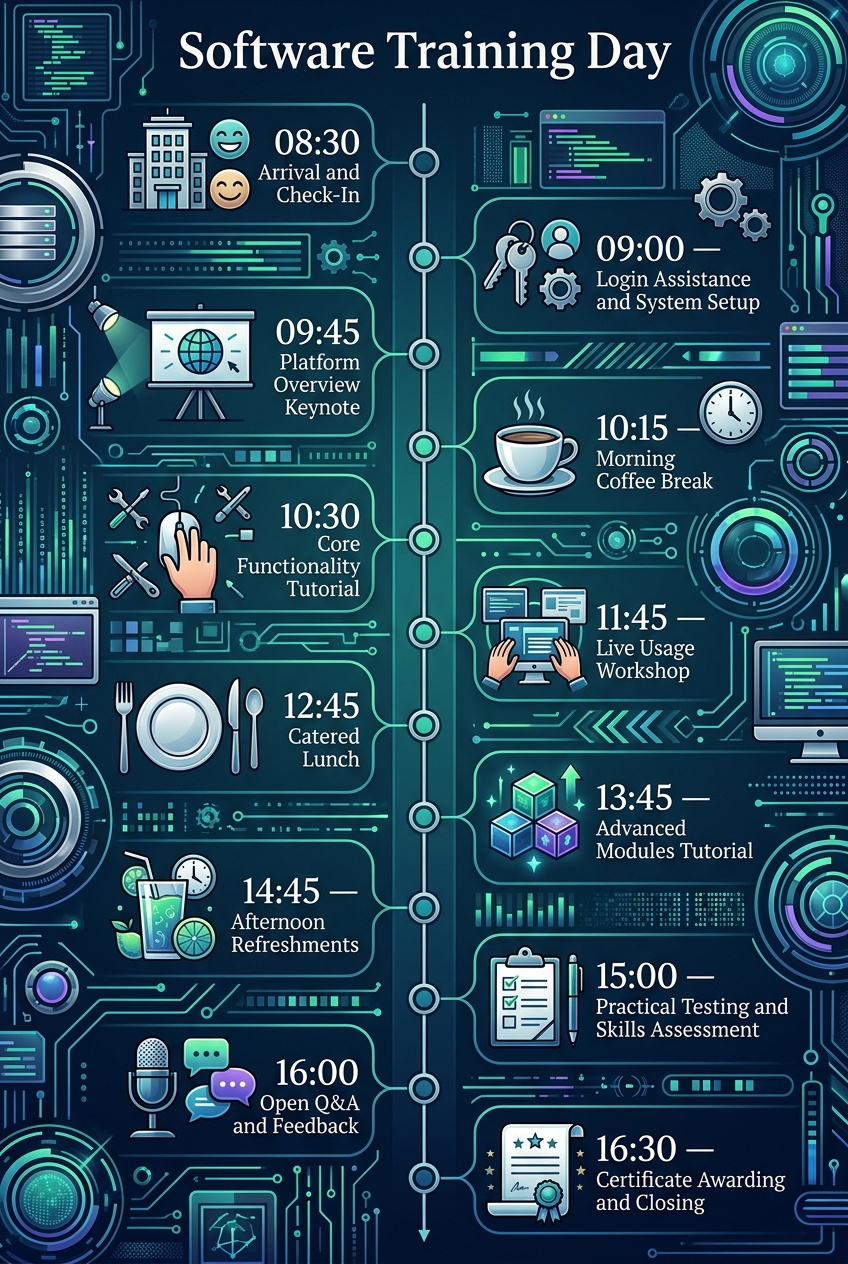
Why Software Training Days Need a Timeline
Introducing new software to employees or clients creates natural friction. When attendees feel lost during a navigation demo, or spend forty-five minutes struggling to log into their enterprise credentials, learning retention plummets. A detailed schedule establishes clear operational momentum, keeping technical support teams proactive rather than reactive.
Without a firm schedule, instructors routinely over-explain basic interface elements and run out of time for critical advanced workflows. Just as executive facilitators rely on a board meeting schedule template to ensure every compliance topic gets dedicated discussion, technical trainers need precise timeboxes to ensure every software module is thoroughly covered and tested.
Finally, a structured schedule respects participant energy levels. High-intensity technical learning causes rapid cognitive fatigue. Building predictable intervals for catered meals and coffee breaks allows participants to digest complex workflows and return to their workstations refreshed and ready for practical testing.
What to Include in a Software Training Day Timeline
To ensure your technical onboarding session delivers quantifiable user adoption, your timeline must balance technical readiness with active hands-on execution:
- Welcome & Credential Setup: Dedicated physical check-in and active login assistance to resolve enterprise permission issues before instruction starts.
- Foundational Architecture Overview: A high-level keynote explaining the system interface, business logic, and overarching strategic goals.
- Core Functionality Instruction: Step-by-step guided tutorials covering daily navigation, standard data entry, and core user tasks.
- Interactive Sandbox Workshop: A risk-free environment where participants manipulate real-world sample datasets with live instructor guidance.
- Advanced Module Training: Specialized instruction covering workflow automation, custom reporting, API integrations, and administrative settings.
- Practical Evaluation & Testing: Hands-on assessment challenges that validate skill acquisition and identify areas needing remediation.
- Closing Q&A & Certification: Open floor troubleshooting, system feedback collection, and formal certificate distribution.
Morning Onboarding & System Access
| Time | Event |
|---|---|
| 08:30 | Arrival and Check-In |
| 09:00 | Login Assistance and System Setup |
| 09:45 | Platform Overview Keynote |
| 10:15 | Morning Coffee Break |
The morning phase establishes the technical foundation for the entire event. Welcoming attendees in the Main Auditorium Lobby allows your team to distribute physical reference manuals, verify badge registration, and direct staff toward assigned workstations. Having IT support personnel physically present in the lobby ensures a warm, organized arrival experience.
Transitioning into Computer Lab A for dedicated login assistance is the single most critical risk-mitigation step of the day. Resolving credential challenges, multi-factor authentication loops, and database permissions before instruction begins prevents costly interruptions during the platform overview keynote. Following the high-level architecture presentation, a morning coffee break in the Cafeteria Lounge offers participants a opportunity to meet peers and prepare mentally for intensive screen time.
Core Skills & Sandbox Workshop
| Time | Event |
|---|---|
| 10:30 | Core Functionality Tutorial |
| 11:45 | Live Usage Workshop |
| 12:45 | Catered Lunch |
Once every participant is successfully logged into the enterprise software, the schedule moves into foundational instruction. The core functionality tutorial uses direct follow-along exercises where attendees replicate instructor navigation on their individual lab terminals. This builds muscle memory for essential interface operations and daily data workflows.
Immediately following the core tutorial, participants move into the live usage workshop. Operating in a controlled sandbox environment with sample data allows users to apply new skills safely without fear of altering production records. Facilitators roam the computer lab offering targeted micro-coaching. A structured, one-hour catered lunch in the Dining Hall gives brains a much-needed break from active problem-solving.
Just as corporate event managers balance structured presentations and social hospitality in an anniversary party schedule template, corporate trainers must seamlessly transition participants from formal instruction into comfortable, restorative social breaks.
Advanced Capabilities & Skills Evaluation
| Time | Event |
|---|---|
| 13:45 | Advanced Modules Tutorial |
| 14:45 | Afternoon Refreshments |
| 15:00 | Practical Testing and Skills Assessment |
The afternoon session dives into advanced capabilities designed to turn standard users into operational power users. Covering API integrations, automated triggers, and custom analytics dashboards equips key department leads to streamline business processes. Scheduling this dense content right after lunch keeps participants focused during peak afternoon productivity hours.
Following a quick refreshment break, attendees undergo a formal practical assessment. Rather than relying on multiple-choice quizzes, participants complete real-world troubleshooting tasks directly within the software. This hands-on evaluation provides quantifiable confirmation that training objectives were met, following research-backed methodology highlighted by learning organizations like the Association for Talent Development.
Wrap-Up, Feedback & Certification
| Time | Event |
|---|---|
| 16:00 | Open Q&A and Feedback |
| 16:30 | Certificate Awarding and Closing |
The final phase transforms individual learning into long-term organizational value. During the open Q&A session, facilitators address fringe edge cases, complex departmental workflows, and real-world implementation worries. Capturing digital feedback surveys while participants are still at their lab terminals yields significantly higher response rates and actionable venue insights.
The day concludes in the Main Auditorium with official certificate awarding. Recognizing completion of the course builds user enthusiasm for the upcoming enterprise deployment. Much like celebrating personal milestones using a birthday party timeline template, ending professional training with formal recognition creates positive associations with what can otherwise feel like an intimidating technological change.
Software Training Day Timeline vs Software Training Agenda
It is common for project managers to confuse a training timeline with a standard agenda. While an agenda outlines what topics will be discussed, a full timeline details how every minute of the physical venue, technical environment, and operational support staff will be coordinated.
| Feature | Software Training Day Timeline | Standard Software Training Agenda |
|---|---|---|
| Primary Focus | Minute-by-minute operational execution and technical readiness | High-level overview of learning topics and course modules |
| Target Audience | Lead instructors, IT support staff, venue operators, and coordinators | Training attendees and department managers |
| Technical Support Details | Includes explicit credentials setup, sandbox loads, and hardware checks | Rarely mentions technical support or login assistance |
| Location Tracking | Maps specific movements between lobbies, computer labs, and dining halls | Lists general session topics without room assignments |
| Risk Management | Accounted buffer times for network glitches and login bottlenecks | Assumes perfect compliance with zero technical delays |
Who Should Use This Template?
This timeline is engineered for organizational leaders and technical facilitators responsible for driving software adoption across teams. You can customize this structure for various corporate learning formats on Chronolio, which supports diverse internal roles involved in event execution:
- Enterprise IT Project Managers: Managing large-scale software implementations (ERP, CRM, HRM) requiring department-wide user sign-off.
- Corporate Technical Trainers: Facilitating hands-on skill development sessions for internal employees or external corporate client teams.
- Human Resources & Onboarding Teams: Structuring standardized software orientation days for new cohort hires.
- SaaS Customer Success Managers: Hosting multi-client onboarding bootcamps to increase feature adoption and reduce product churn.
- Healthcare & Financial Compliance Leads: Conducting mandatory systems training where verified user competency is a regulatory requirement.
How to Use This Template
- Download or Duplicate the Template: Select your preferred format using our Word Document Download or PDF Download, or edit directly on Chronolio.
- Adjust Environment Schedules: Customize the login assistance block based on your organization's specific authentication complexity (e.g., hardware tokens vs. standard SSO).
- Assign Technical Staff: Designate named IT support specialists to specific rooms during the arrival and testing blocks.
- Distribute to Attendees & Catering: Send the timing plan to venue coordinators and catering staff so meals coincide exactly with session breaks.
- Print Room Guides: Post printed schedule summaries outside computer labs and auditorium entrances to keep attendees moving efficiently.
Tips for a Successful Software Training Day
- Pre-Provision User Accounts: Verify that all user profiles, software licenses, and sandbox environment datasets are populated 24 hours before attendees step foot in the lab.
- Maintain a 1:10 Support Ratio: Provide at least one roving technical assistant for every ten participants during hands-on sandbox workshops.
- Enforce Strict Timeboxing: Keep lecture segments short and spend at least 60% of total training hours on direct workstation interaction. Research from the Nielsen Norman Group demonstrates that interactive application dramatically improves digital interface retention compared to passive viewing.
- Provide Printed Cheat Sheets: Screen toggling between instruction slides and software interfaces slows users down; physical manual guides help attendees stay aligned.
- Capture Real-Time Feedback: Run your feedback survey directly before certificate distribution to ensure 100% submission rates.
Common Mistakes to Avoid
- Skipping Dedicated Login Time: Assuming participants will log in seamlessly at 09:00 without dedicated IT support causes instant schedule delays.
- Overloading Morning Lectures: Packing complex system settings into early slide decks causes learner fatigue long before hands-on practice begins.
- Neglecting Sandbox Isolation: Allowing attendees to practice in live staging environments where real company records can be accidentally overwritten or deleted.
- Underestimating Network Bandwidth: Forgetting to test local Wi-Fi and server bandwidth when forty workstations simultaneously attempt high-volume database queries.
- Omitting Practical Testing: Wrapping up training without verified skill assessments, leaving management unsure if participants can operate the system independently.
In Summary
- A software training day timeline coordinates technical setup, instruction, practical testing, and certification into a structured full-day schedule.
- Dedicated login assistance buffers prevent enterprise credential failures from derailing core instructional modules.
- The workflow balances theoretical system keynotes with interactive sandbox experimentation and formal skills evaluations.
- Structured breaks in separate facilities (cafeteria, dining hall) prevent cognitive burnout during complex technical training.
- Adaptable for enterprise IT rollouts, customer success workshops, compliance training, and HR onboarding cohorts.
Maximizing technology investments requires giving your team the structured time, technical support, and hands-on practice needed to build true confidence. Adapt this operational schedule to your platform's specific needs, coordinate your technical support team, and lead a flawless corporate training event.
Customize Your Software Training Day Timeline