This Template at a Glance
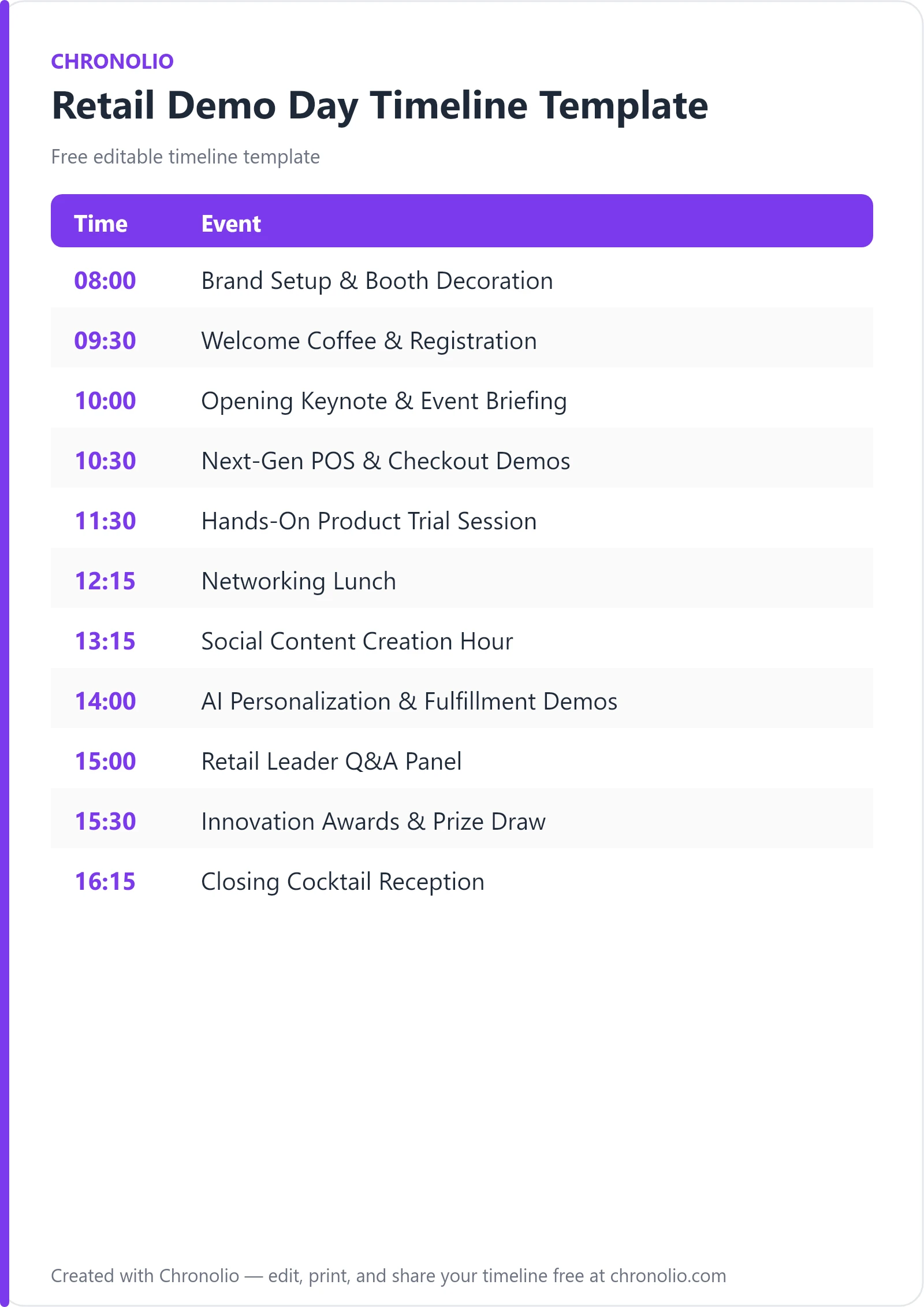
Here is the complete schedule this free template gives you — every time block, ready to edit, download, and share:
| Time | Event |
|---|---|
| 08:00 | Brand Setup & Booth Decoration |
| 09:30 | Welcome Coffee & Registration |
| 10:00 | Opening Keynote & Event Briefing |
| 10:30 | Next-Gen POS & Checkout Demos |
| 11:30 | Hands-On Product Trial Session |
| 12:15 | Networking Lunch |
| 13:15 | Social Content Creation Hour |
| 14:00 | AI Personalization & Fulfillment Demos |
| 15:00 | Retail Leader Q&A Panel |
| 15:30 | Innovation Awards & Prize Draw |
| 16:15 | Closing Cocktail Reception |
What Is a Retail Demo Day Timeline?
A retail demo day timeline is an operational schedule that coordinates exhibitors, tech presenters, media representatives, and attendees through a series of live product demonstrations and networking sessions. Running an experiential trade showcase or emerging brand activation requires strict chronological management. Without a shared schedule, exhibitors miss AV run-throughs, high-value buyers wander aimlessly between booths, and key live demonstrations overlap.
Having managed dozens of multi-vendor tech showcases, I can tell you that real-world retail events succeed on predictable timing. Brands need quiet load-in windows to configure digital signage and smart displays, while attendees need distinct blocks to alternate between sit-down keynote briefings and interactive hands-on testing. This template reflects proven industry standards, balancing active product discovery with deliberate networking downtime.
Use this Retail Demo Day Timeline Template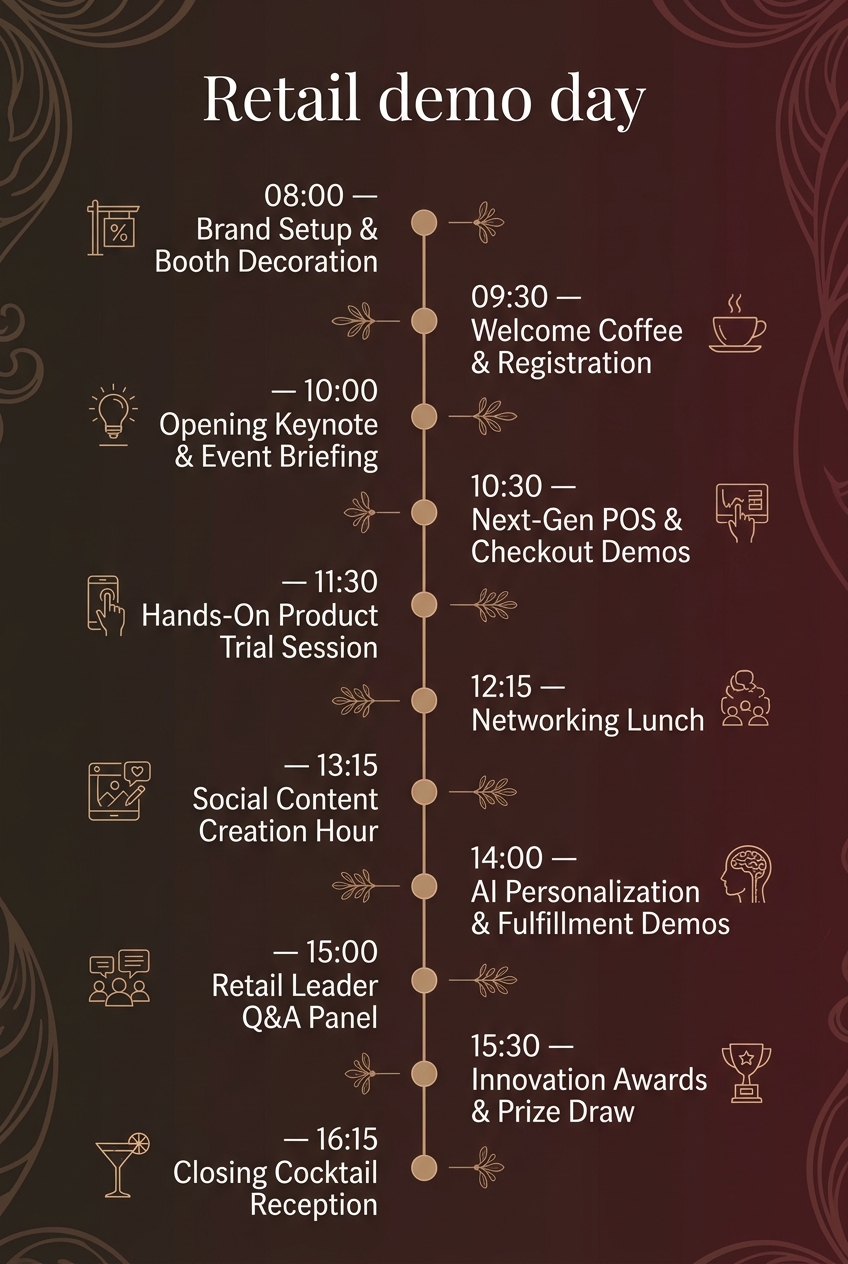
Why Retail Demo Days Need a Timeline
Executing an engaging, interactive showcase involves coordinating hardware setups, live internet feeds, media representatives, and guest speakers simultaneously. A precise schedule acts as the master operational blueprint for your entire venue team.
- Flawless technical execution: Live tech walk-throughs require reliable Wi-Fi, audio feeds, and screen mirroring. A clear timeline ensures that exhibitor loads and AV checks finish before doors open, preventing technical delays during client presentations.
- Synchronized visitor flow: If all attendees crowd the display floor at once, booths become congested and visitors miss key demonstrations. Staggering keynotes, interactive trials, and networking meals distributes floor traffic evenly across exhibition zones.
- Maximum social media reach: Content creators and influencers need dedicated time blocks to record clear product footage. Setting aside explicit photo and video windows amplifies online visibility across digital channels.
- Vendor and sponsor accountability: Participating brands pay for visibility and dedicated screen time. A published schedule ensures every featured exhibitor gets equal stage time and audience exposure.
What to Include in a Retail Demo Day Timeline
To deliver a high-impact event experience, your schedule should outline every phase of the guest and exhibitor journey:
- Pre-event load-in and staging: Dedicated quiet hours for vendors to unbox hardware, calibrate smart devices, and test promotional displays.
- Attendee arrival and check-in: Guest badge collection, morning refreshments, and welcome packets.
- Framing keynotes: A short opening presentation that establishes the theme and highlights featured innovations.
- Categorized demo blocks: Structured time slots focused on specific tech categories, such as point-of-sale systems or artificial intelligence tools.
- Interactive hands-on testing: Unstructured floor time allowing attendees to engage directly with brand ambassadors and product units.
- Social content creation windows: Dedicated quiet or well-lit blocks for recording promotional videos, interviewing founders, and posting tagged social media content.
- Awards and informal networking: Closing ceremonies and casual social receptions that convert initial demos into long-term commercial partnerships.
Morning Setup & Welcome Briefing
The first hours of your event dictate the operational momentum of the entire day. Allowing adequate time for physical load-in and technical staging avoids chaotic last-minute setups while guests register.
| Time | Event |
|---|---|
| 08:00 | Brand Setup & Booth Decoration |
| 09:30 | Welcome Coffee & Registration |
| 10:00 | Opening Keynote & Event Briefing |
Never underestimate the time required for hardware configuration and display calibration on the show floor. Participating brands load in promotional materials, configure digital displays, and arrange product showcases across designated demo booths in the Main Exhibition Hall starting bright and early at 08:00. This 90-minute buffer allows venue staff to troubleshoot network connectivity and audio checks before any attendees arrive.
Once doors open at 09:30 at the Atrium Cafe, guests, retail partners, and media representatives check in, collect name badges, and enjoy morning refreshments. Keeping registration separate from the main floor prevents entry bottlenecking. At 10:00, everyone transitions to the Main Stage where event organizers welcome participants and present an overview of the key retail innovations and live demonstrations scheduled for the day. Setting explicit expectations early helps buyers prioritize which brand booths they must visit.
Interactive POS & Hands-On Trials
The late morning block is where attendees first engage directly with featured technologies. Grouping complementary software and hardware solutions keeps attendee focus sharp.
| Time | Event |
|---|---|
| 10:30 | Next-Gen POS & Checkout Demos |
| 11:30 | Hands-On Product Trial Session |
At 10:30, activities transition to Demo Zone A, where exhibitors conduct live walkthroughs of automated point-of-sale systems, frictionless payment flows, and smart inventory management tech. Rather than letting vendors speak indefinitely, limiting feature presentations to focused time blocks maintains high audience energy and ensures presenters stay on message.
Following the structured presentations, the group moves to the Interactive Tech Floor at 11:30 for open exploration. Visitors test interactive displays, smart mirrors, and digital fitting rooms with guidance from brand ambassadors. This hands-on period gives prospective buyers direct touchpoints with hardware features that static slides simply cannot replicate.
Midday Networking & Social Media Amplification
Midday sessions must balance physical rest with active digital engagement. Providing dedicated spaces for informal discussions and media capture drives both real-world deals and online buzz.
| Time | Event |
|---|---|
| 12:15 | Networking Lunch |
| 13:15 | Social Content Creation Hour |
At 12:15, transition all guests toward the Dining Pavilion. Guests enjoy a gourmet lunch buffet while connecting with brand founders, software developers, and fellow retail professionals. Structured lunch periods are essential; if attendees are forced to hunt for food outside the venue, afternoon attendance inevitably drops.
Immediately following lunch at 13:15, open the Social Media Lounge. Influencers and attendees capture video footage at branded photo stations and upload live social media posts featuring official event hashtags. Designating a specific hour for content creation ensures that creators aren't trying to film over crowded speaker presentations, while providing brands with immediate online exposure. Industry trade bodies like the National Retail Federation frequently emphasize that digital engagement during live events significantly extends brand reach beyond physical attendees.
Afternoon AI Deep Dives & Industry Panels
The afternoon session tackles complex software architecture, artificial intelligence applications, and strategic industry discussions when attendees are ready for deeper analysis.
| Time | Event |
|---|---|
| 14:00 | AI Personalization & Fulfillment Demos |
| 15:00 | Retail Leader Q&A Panel |
At 14:00, redirect attention to Demo Zone B. Live presentations highlight artificial intelligence tools for hyper-personalized shopping recommendations and automated order fulfillment. Position these technical deep dives after lunch when attendees have settled back into the event flow.
At 15:00, transition into Conference Room 1 for the Retail Leader Q&A Panel. Industry experts answer questions regarding adoption strategies, implementation costs, and consumer behavior shifts. While planning formal executive gatherings shares common strategic goals with our board meeting timeline template, a demo day panel should feel conversational and directly address friction points raised during the morning product demos.
Awards, Raffles & Closing Reception
Ending the day on a celebratory note reinforces positive impressions and gives participants an informal setting to finalize commercial discussions initiated on the exhibit floor.
| Time | Event |
|---|---|
| 15:30 | Innovation Awards & Prize Draw |
| 16:15 | Closing Cocktail Reception |
Reconvene all attendees at the Main Stage at 15:30 to recognize the best retail tech solution of the day as voted by attendees, followed by a raffle draw for participating guests. Interactive voting maintains attendee presence through the late afternoon and offers clear recognition to outstanding exhibitors.
Wrap up the event at 16:15 in the Rooftop Lounge with craft drinks, light appetizers, and informal closing conversations on the outdoor terrace. While planning celebratory social gatherings often shares logistical elements with an anniversary party schedule template or even a structured birthday party timeline template, an executive cocktail reception must focus primarily on high-value networking and professional relationship building.
Retail Demo Day Timeline vs. Event Running Order
Event planners frequently confuse high-level agenda schedules with detailed operational running orders. Understanding the structural differences ensures your staff and attendees receive the exact details they need.
| Feature | Retail Demo Day Timeline | Master Event Running Order |
|---|---|---|
| Primary Audience | Attendees, Buyers, Media, Exhibitors | Event Directors, AV Crew, Venue Operations |
| Detail Level | High-level session blocks & feature areas | Minute-by-minute cues, lighting, & mic assignments |
| Focus Area | Customer experience & presentation topics | Behind-the-scenes execution & technical triggers |
| Format | Public digital agenda, app display, or print flyer | Internal operational spreadsheet or cue sheet |
A public timeline informs attendees where to be and what technologies are being highlighted. In contrast, an internal running order specifies precise technical cues, such as when the AV technician switches stage lighting or cues background audio tracks for keynote speakers.
Who Should Use This Template?
This showcase template is designed for event organizers and retail strategists managing modern experiential product launches, including:
- Retail Technology Incubators: Accelerators presenting cohort startups to venture capitalists and enterprise brand partners.
- Commercial Real Estate Developers: Property managers showcasing emerging retail concepts to prospective shopping center tenants.
- Enterprise Software Vendors: SaaS companies hosting client summits to reveal new point-of-sale or inventory management platforms.
- Direct-to-Consumer (DTC) Brands: Emerging consumer product companies debuting physical pop-up activations for retail buyers.
- Trade Associations: Regional trade groups hosting innovation showcases for local business owners.
Chronolio offers customized scheduling tools tailored for different operational roles, ensuring venue managers, technical leads, and marketing coordinators stay synchronized throughout the planning cycle.
How to Use This Template
- Download or duplicate the template: Choose your preferred format by accessing the editable template online or downloading our pre-formatted version as a Retail Demo Day Docx or Retail Demo Day PDF.
- Adjust for venue scale: Modify the session lengths and setup windows based on your total exhibitor count and physical venue square footage.
- Assign floor zones: Map each agenda block directly to specific physical locations (e.g., Demo Zone A, Main Stage, Rooftop Lounge) to manage foot traffic.
- Distribute to stakeholders: Share custom views with participating exhibitors, AV contractors, and attendees at least two weeks before the event date.
Tips for a Successful Retail Demo Day
- Enforce strict presentation timers: Use visible countdown monitors on stage so presenters do not run over their allotted demo slots.
- Test dedicated Wi-Fi networks in advance: Cloud-based POS tools and live AI demos depend heavily on bandwidth. Provide a dedicated, password-protected network exclusively for exhibitors.
- Create clear lighting environments: Ensure demo booths are well-lit for social media video recording while maintaining readable glare-free displays.
- Incentivize buyer feedback: Use digital voting passes or QR code feedback forms to encourage attendees to evaluate each live product demo.
- Provide accessible charging hubs: Keep attendees engaged on the show floor longer by placing mobile device charging stations near networking lounges.
- Incorporate buffer time between sessions: Build 10- to 15-minute windows into stage transitions so technical crews can reset audio mics and display inputs smoothly.
Common Mistakes to Avoid
- Overcrowding the speaker schedule: Packing too many consecutive presentations onto the stage leads to attendee fatigue and reduces overall engagement.
- Neglecting setup buffers: Failing to allocate at least 90 minutes for vendor load-in creates chaotic registration environments and delayed start times.
- Ignoring audio isolation: Placing high-volume audio presentations too close to quiet consultation tables makes buyer conversations difficult.
- Forgetting dedicated content slots: If you don't schedule explicit time for photography and social media, attendees will record footage during live speeches, distracting presenters.
- Failing to brief brand ambassadors: Ensure all booth personnel know the exact timeline, room locations, and technical procedures before doors open.
- Skipping the technical dress rehearsal: Never skip a complete run-through of stage screen-mirroring and microphone switching prior to guest check-in.
In Summary
- A retail demo day timeline structures vendor load-in, live tech walkthroughs, interactive testing, and professional networking into an optimized schedule.
- Proper setup timing requires allocating 90 minutes prior to guest registration for AV checks and display calibration.
- Alternating session types—balancing sit-down keynotes with interactive floor trials—maintains buyer engagement throughout the day.
- Dedicated social content hours significantly increase online brand visibility and event hashtag reach across digital channels.
- Structured Q&A sessions and awards encourage active audience participation while highlighting top-rated retail solutions.
- Using customizable templates ensures venue operations, exhibitors, and media personnel remain perfectly aligned from load-in to cleanup.
Planning experiential brand activations demands meticulous chronological management. Whether you are coordinating a large-scale commercial tech showcase, structuring specialized vendor events, or exploring social formats like our baby shower timeline template and catholic wedding timeline, maintaining clear time management guarantees a polished, professional outcome for every attendee and vendor involved.
Use this Retail Demo Day Timeline Template