
This Template at a Glance
Here is the complete schedule this free template gives you — every time block, ready to edit, download, and share:
| Time | Event |
|---|---|
| 08:30 | Guest Arrival and Welcome Coffee |
| 09:15 | Executive Keynote: Strategic Vision |
| 09:45 | Platform Overview and Core Feature Demo |
| 10:45 | Morning Refreshment Break |
| 11:00 | Software Training: Pipeline & Sales Management |
| 12:15 | Networking Buffet Lunch |
| 13:15 | Software Training: Customer Support & Workflows |
| 14:30 | Live Demo: Reporting & Custom Dashboards |
| 15:15 | Afternoon Tea Break |
| 15:30 | Implementation Panel & Open Q&A |
| 16:15 | CRM Champions Recognition |
| 16:35 | Wrap-Up and Go-Live Timeline |
| 16:50 | Launch Celebration Social |
What Is a CRM Rollout Event Timeline?
A CRM rollout event timeline is an operational master plan that governs the schedule, venue movement, speaker presentations, and software training sessions during a company's software launch day. Introducing enterprise platforms like Salesforce, HubSpot, or Microsoft Dynamics requires far more than emailing login credentials to your staff; it demands an engaging, well-orchestrated launch event that builds cross-departmental alignment and practical software skills.
In my years managing enterprise learning facilities and hosting corporate technology launches, I have seen brilliant software upgrades fail simply because the launch event felt overwhelming or disorganized. A well-structured schedule prevents training fatigue, guarantees that technical teams remain on schedule, and gives end users clear expectations from morning coffee to the final go-live toast. This guide and timeline draw directly from real-world corporate change management strategies, offering a proven framework to maximize user adoption on day one.
Customize Your CRM Rollout Event Schedule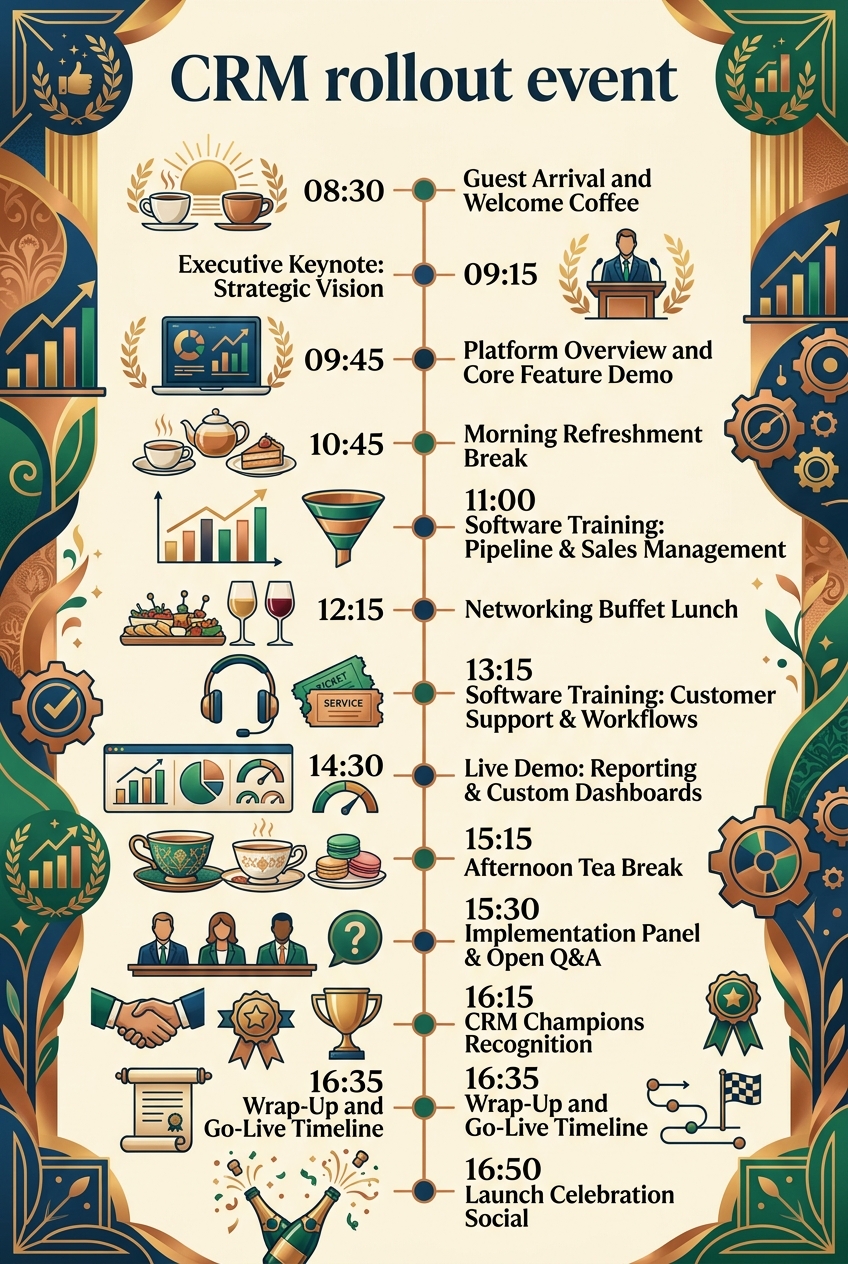
Why CRM Rollout Events Need a Timeline
Deploying enterprise technology across diverse departments like sales, marketing, and customer support is inherently complex. Without a strict timeline, morning keynotes run long, hands-on training labs get compressed, and attendees lose the practical, hands-on experience needed to feel confident in the new software platform.
Having run dozens of these launches, I know that keeping strict timing maintains high energy levels and preserves vital technical Q&A sessions. A detailed schedule provides several critical operational benefits:
- Cross-Departmental Synchronization: Ensures sales representatives, support staff, and account managers transition smoothly between general keynotes in the main hall and specialized training labs.
- Pacing and Fatigue Prevention: Distributes dense technical demonstrations between structured refreshment breaks, networking lunches, and social interactions to maintain focus.
- Technical Sandbox Stability: Gives IT support engineers clear windows to refresh training data and manage local network bandwidth between hands-on training modules.
- Executive Accountability: Keeps C-suite sponsors and technical project leaders aligned on exact presentation durations and go-live milestone announcements.
Much like managing executive governance schedules in a board meeting schedule template, structured corporate time management builds trust across all levels of leadership and staff.
What to Include in a CRM Rollout Event Timeline
A successful enterprise software launch balances strategic vision with practical hands-on capability. When structuring your event itinerary, ensure your schedule incorporates these foundational phases:
- Welcome Reception & Check-In: Morning registration, badge collection, and informal networking over breakfast coffee.
- Executive Keynote & Strategic Vision: Leadership presentation framing the operational benefits, business goals, and company vision for the software upgrade.
- Core Platform Demo: High-level walkthrough of system navigation, global search features, personal settings, and main dashboards.
- Role-Specific Training Labs: Hands-on breakout workshops dedicated to specific workflows, such as sales pipeline management and customer service ticket tracking.
- Analytics & Reporting Showcase: Live demonstration on generating automated executive reports, tracking KPIs, and building custom user dashboards.
- Implementation Panel & Open Q&A: Interactive session with IT engineers, data migration leads, and departmental leaders to resolve user concerns.
- Super-User Recognition & Go-Live Roadmap: Honoring internal CRM champions and outlining support resources, helpdesk protocols, and system go-live milestones.
- Post-Event Launch Celebration: Casual social hour to celebrate project milestones and build positive morale around adoption.
Morning Keynote & Strategic Vision
| Time | Event |
|---|---|
| 08:30 | Guest Arrival and Welcome Coffee |
| 09:15 | Executive Keynote: Strategic Vision |
| 09:45 | Platform Overview and Core Feature Demo |
| 10:45 | Morning Refreshment Break |
The opening phase sets the tone for your entire change management strategy. Starting at 08:30 in the Main Foyer, allowing 45 minutes for registration and coffee gives staff time to network, settle into the venue, and clear early-morning emails before technical sessions begin. Smooth check-in prevents bottlenecking at auditorium entrances and ensures keynotes start promptly.
At 09:15, transition everyone into Auditorium A for the Executive Keynote. Having C-suite leaders frame the strategic necessity of the platform transition creates immediate top-down buy-in. Transitioning directly into the Platform Overview at 09:45 provides immediate visual context, showing staff what the software looks like before diving into complex workflows. Finishing the block with a 15-minute break in the Exhibition Hall allows users to process the overview before entering technical breakout sessions.
Deep-Dive Hands-On Training & Workflow Sessions
| Time | Event |
|---|---|
| 11:00 | Software Training: Pipeline & Sales Management |
| 12:15 | Networking Buffet Lunch |
| 13:15 | Software Training: Customer Support & Workflows |
| 14:30 | Live Demo: Reporting & Custom Dashboards |
| 15:15 | Afternoon Tea Break |
The middle portion of the day shifts focus from broad concept overview to direct software competency. Starting at 11:00 in Training Lab 1, limiting hands-on training sessions to 75 minutes strikes the perfect balance between thorough skill building and cognitive load management. Dedicated training on lead creation, opportunity stages, and pipeline hygiene provides immediate value for sales professionals.
A full 60-minute catered lunch in the Dining Hall at 12:15 gives attendees crucial mental recovery time while sparking peer-to-peer discussions about new software capabilities. Promptly at 13:15, resume with support and workflow ticketing workshops, followed by executive analytics and dashboard customization back in Auditorium A. Capping off this intense learning block with an afternoon tea break at 15:15 ensures attendees return refreshed for technical Q&A.
Q&A, Recognition & Go-Live Strategy
| Time | Event |
|---|---|
| 15:30 | Implementation Panel & Open Q&A |
| 16:15 | CRM Champions Recognition |
| 16:35 | Wrap-Up and Go-Live Timeline |
| 16:50 | Launch Celebration Social |
The final stretch of the schedule addresses lingering technical anxiety and celebrates project contributors. Gathering in Auditorium A at 15:30 for an open Q&A panel gives staff direct access to data migration engineers, system integrators, and software administrators. Answering honest questions about legacy data, integration plugins, and permission levels in an open forum builds immense trust across departments.
At 16:15, taking time to publicly recognize internal departmental super-users and beta testers fosters peer leadership. These CRM Champions become the first line of support once software goes live. Summarizing support ticketing channels, knowledge base links, and final rollout dates at 16:35 provides a clear operational handoff before attendees transition to the Lounge Terrace at 16:50 for a well-earned launch celebration. Just as hosting a milestone celebration using an anniversary party schedule template relies on ending with high energy, celebrating software deployment milestones reinforces enterprise culture.
CRM Rollout Event Timeline vs Project Implementation Plan
Event organizers frequently confuse a event schedule with a general IT project plan. While both support system delivery, their focus, audience, and operational scope differ significantly.
| Feature | CRM Rollout Event Timeline | IT Project Implementation Plan |
|---|---|---|
| Primary Focus | User enablement, training execution, change management, and launch engagement. | Backend configuration, data migration, API integration, and security testing. |
| Time Horizon | Single-day operational schedule down to exact minute intervals. | Multi-month or multi-quarter project management roadmap with task dependencies. |
| Target Audience | All end users, department heads, sales teams, support staff, and executives. | Software developers, database architects, IT administrators, and project managers. |
| Key Deliverable | Trained end users, reduced system anxiety, and high immediate feature adoption. | Deployed cloud architecture, clean data schemas, and validated security protocols. |
| Format | Event agenda, session running order, and training facility floor plan. | Gantt charts, sprint backlogs, risk matrices, and technical tickets. |
While technical teams track backend deliverables over months using Gantt charts, the rollout event timeline manages the precise flow of attendees, guest speakers, caterers, and classroom lab environments on launch day itself.
Who Should Use This Template?
This event schedule template is purpose-built for enterprise team leaders, corporate trainers, and technical project managers responsible for software adoption.
- Enterprise Change Management Teams: Aligning multi-departmental personnel during major software migrations.
- IT Project Managers & Systems Administrators: Coordinating live technical demonstrations and managing interactive sandbox environments.
- Sales & Commercial Operations Leaders: Training account executives on new pipeline reporting protocols and deal tracking tools.
- Customer Support & Success Directors: Guiding helpdesk teams through ticket routing automation and customer record logging.
- Corporate Event Planners: Managing venue logistics, speaker timing, audiovisual systems, and catering flow for enterprise technology summits.
- Executive Leadership Teams: Communicating strategic ROI and corporate digital transformation goals to staff.
Whether you are coordinating internal technology training, managing formal corporate governance sessions using a board meeting schedule, or structuring personal milestone events like a birthday party schedule or a baby shower schedule, structured timelines are the backbone of flawless execution. To assist your team, Chronolio tailored tailored role-based views for event managers in our solutions for event planners platform.
How to Use This Template
Executing a seamless corporate software launch requires quick adaptation to your organization’s specific department sizes and venue layout.
- Download or Duplicate: Access this timeline directly within Chronolio or export our editable templates via our formatted Word document template or ready-to-print PDF schedule format.
- Adjust Training Breakouts: Modify training lab duration and topic focus based on your company’s core modules (e.g., swapping sales pipeline labs for marketing automation tracks).
- Assign Presentation Owners: Add presenter names, speaker bio links, and technical sandbox URLs to every timeline item.
- Coordinate Venue & IT Logistics: Share the timeline with facility operators, AV crews, and network engineers to ensure sandbox Wi-Fi bandwidth and room setups match your schedule.
- Publish to Attendees: Distribute the finalized running order to all employees via email, calendar invites, and physical event signage prior to launch morning.
Tips for a Successful CRM Rollout Event
- Pre-Configure Training Sandbox Environments: Ensure every user seat in Training Lab 1 has test logins pre-loaded with realistic company test data so training time isn't wasted troubleshooting passwords.
- Brief Keynote Speakers on Rigid Time Keeping: Executive keynotes naturally tend to spill over. Assign a dedicated floor manager with timing cards to keep leadership presentations on schedule.
- Utilize Departmental CRM Champions: Station trained super-users throughout training labs to assist colleagues individually during hands-on workshop exercises.
- Dedicating Dedicated Wi-Fi SSIDs for Labs: Isolate training lab network traffic from general guest Wi-Fi to prevent bandwidth throttling during live reporting and database searches.
- Record All Main Stage Sessions: Capture high-definition recordings of Auditorium A presentations and demos to publish in your corporate learning portal for onboarding future hires.
- Provide Immediate Feedback Channels: Place QR codes on dining tables and podiums allowing attendees to submit technical questions during breaks for the afternoon Q&A panel.
- Keep Catering Refreshments Light: Heavy afternoon meals cause mid-day drowsiness. Choose balanced catering menus for lunch and tea breaks to sustain focus through afternoon analytics sessions.
Common Mistakes to Avoid
- Overloading the Agenda with Technical Jargon: Failing to explain why workflows are changing during executive keynotes alienates non-technical sales and support staff.
- Skipping Live Hands-On Workflows: Relying solely on PowerPoint slides rather than letting users click through live sandbox instances drastically reduces skill retention.
- Neglecting Buffer Times Between Breakouts: Scheduling back-to-back sessions without 15-minute room transition windows causes hallway bottlenecks and delayed training starts.
- Leaving Technical Support Off the Q&A Panel: Omitting IT system administrators from the afternoon Q&A panel leaves complex migration questions unanswered.
- Forgetting Pre-Event Network Load Testing: Failing to stress-test local training lab Wi-Fi under heavy concurrent user load can freeze live demo databases.
- Ignoring Immediate Post-Event Support Plans: Leaving staff without clear support channels or helpdesk escalation paths on go-live day creates immediate friction.
Research from leading organizational management authorities like Harvard Business Review emphasizes that user adoption relies heavily on peer support and executive clarity during organizational transitions. Additionally, enterprise technology research from Gartner shows that structured change management initiatives double the probability of meeting software ROI goals.
In Summary
- A CRM rollout event timeline is a comprehensive master schedule balancing executive keynotes, hands-on user training, live software demos, and technical Q&A panels.
- It serves enterprise project managers, IT administrators, corporate change teams, and executive sponsors launching new business software.
- Strict adherence to training duration limits and structured refreshment breaks prevents employee training fatigue.
- Interactive software training labs build practical skill confidence far more effectively than static slide presentations.
- Publicly recognizing internal CRM champions builds peer leadership and establishes strong departmental support networks.
- Chronolio provides flexible, fully customizable tools that allow project leaders to adapt launch itineraries to match their exact venue schedules.
Launching new enterprise software successfully requires combining strategic leadership messaging with practical skill building. By using this CRM rollout event timeline template, change management officers, enterprise IT teams, and event operators can deliver an engaging, perfectly timed rollout day that drives immediate software adoption and long-term organizational success.
Customize Your CRM Rollout Event Schedule